SMS Consent Policy
Last updated: September 21, 2026
Recepso (operated by Langly Inc.) runs two separate text-messaging programs, each with its own consent mechanism, described in full below. A number enrolled in one program is never enrolled in the other, and neither program's mobile numbers or messaging consent are shared, sold, or provided to third parties or affiliates for marketing or promotional purposes.
Program 1: Sales outreach
Recepso uses SMS and WhatsApp to follow up with business prospects and customers who have already engaged directly with a Recepso sales representative -- by phone call or email. We do not purchase phone number lists, and we do not text anyone who has not first had a direct conversation with our team.
Program 1: how consent is obtained
Recepso does not collect this program's SMS consent through a website form. Consent is obtained verbally, during the sales conversation itself:
- A prospect speaks with a Recepso sales representative by phone, or exchanges emails with one, as part of normal business contact (e.g. requesting a demo, asking about pricing).
- Before sending any text message, the representative explicitly asks for permission -- for example, "Would it be alright if I text you a link to get started?" -- and only proceeds after the prospect verbally agrees.
- Each subsequent message is a one-to-one follow-up tied to that specific conversation (e.g. a signup link, an answer to a question the prospect raised). Messages are composed and sent individually by the representative -- there is no automated, scheduled, or bulk sending.
Program 1: required disclosures
Every sales-outreach message we send includes:
- Clear identification that the message is from Recepso.
- Instructions to reply STOP to opt out at any time.
- A note that message and data rates may apply.
Message frequency varies based on the conversation and is never more than what's needed to continue a specific follow-up. Standard carrier message and data rates apply. For help, reply HELPto any message, or contact us atrecepso@recepso.com.
Program 1: opting out
Reply STOP (or UNSUBSCRIBE, CANCEL,QUIT, OPTOUT, STOPALL, REVOKE, or END) to any sales-outreach message from Recepso to stop receiving further texts. We honor opt-outs immediately and will not send another message to that number unless the recipient separately re-consents.
Program 2: Account & service notifications
Separately from sales outreach, a Recepso customer can opt in to receive transactional text alerts about their own account and their AI receptionist's activity: a call flagged as urgent, a missed or dropped call, a message the AI receptionist could not resolve on its own, an appointment request or reminder awaiting the customer's confirmation, their monthly plan usage limit being reached, and service issues such as a call the AI pipeline could not handle. An appointment-request alert includes a secure link to confirm or reject the request. These messages are sent only to that customer's own mobile number, about that customer's own account activity -- never to their callers, and never to anyone else. There is no cold acquisition, purchased list, scraped contact, or public web form for this program.
Program 2: how consent is obtained
Consent is self-service and given directly by the customer, on one of the three screens inside the Recepso application where text alerts can be turned on:
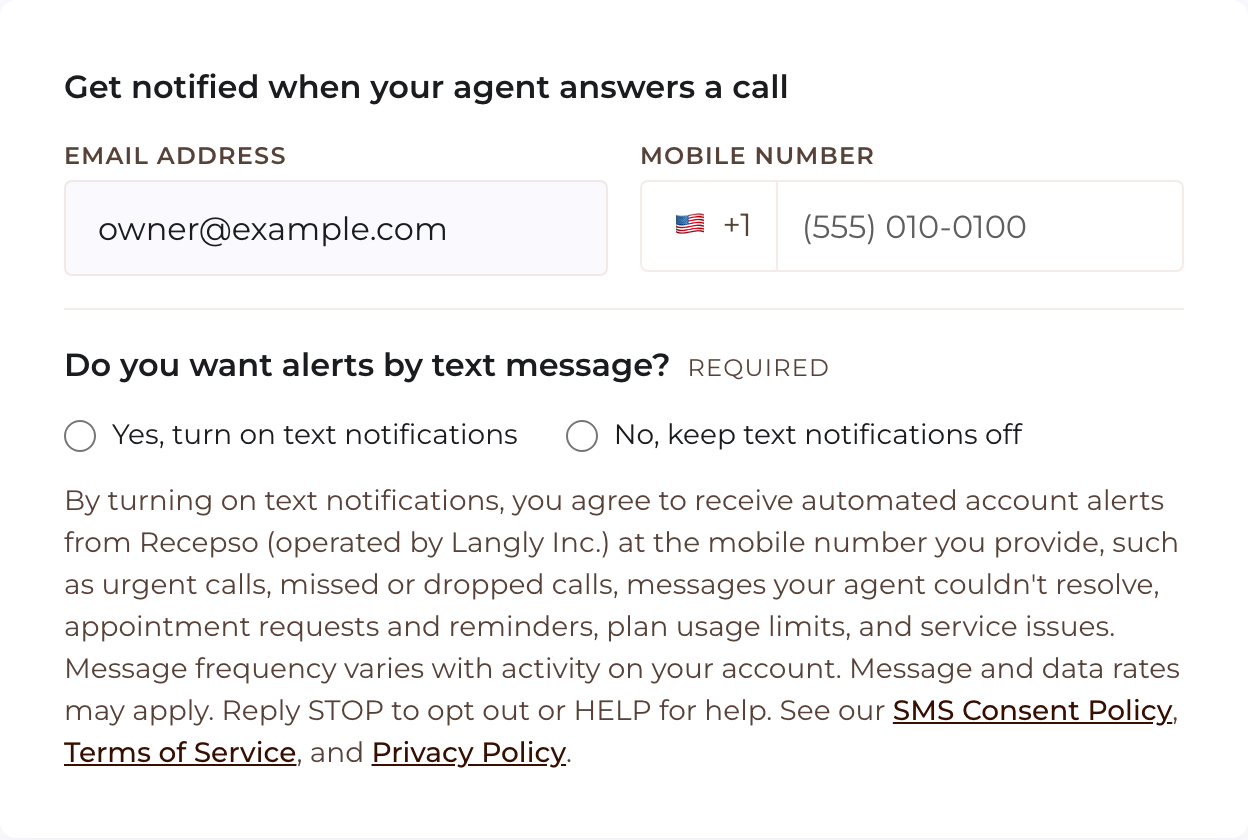
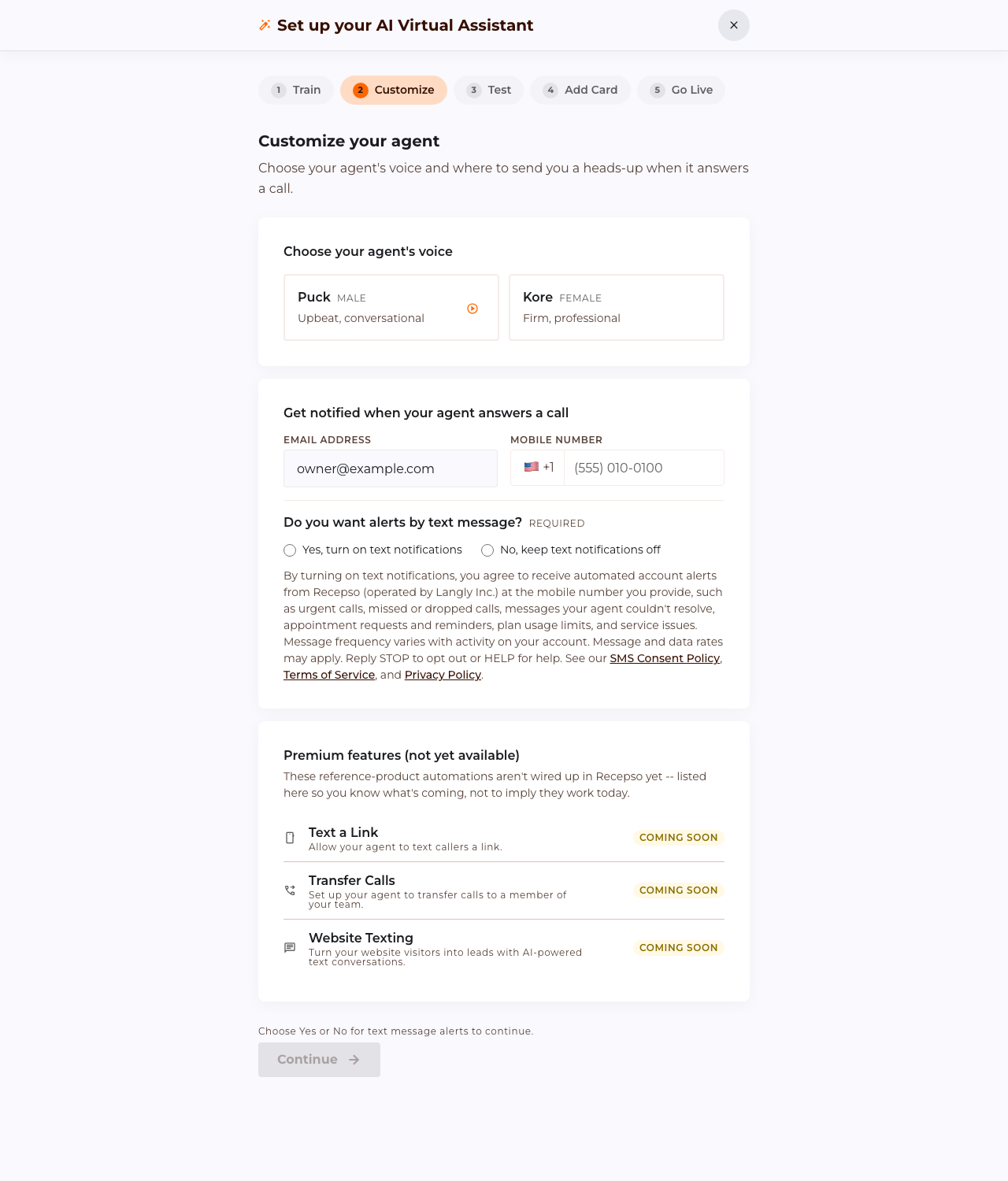
- The Customize step of account setup (also shown in the Quick Start Guide), under “Get notified when your agent answers a call,” where a required question asks “Do you want alerts by text message?”
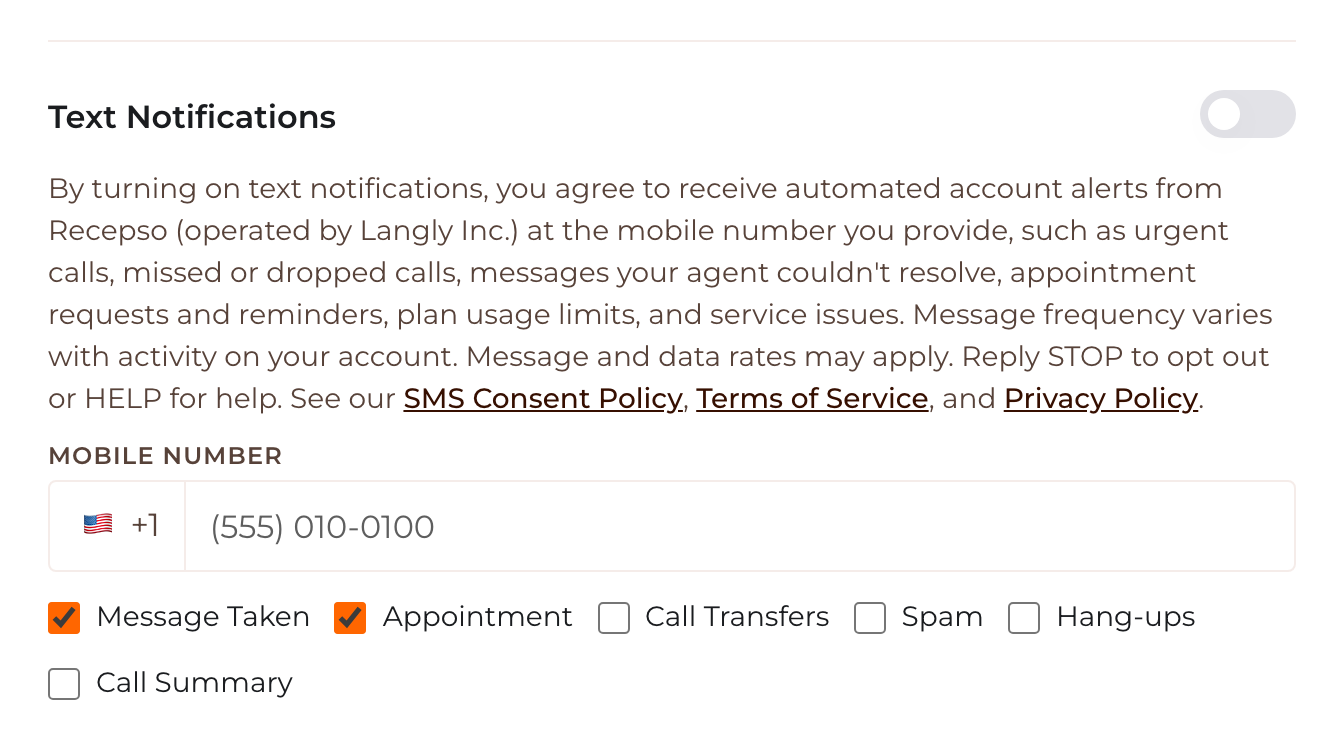
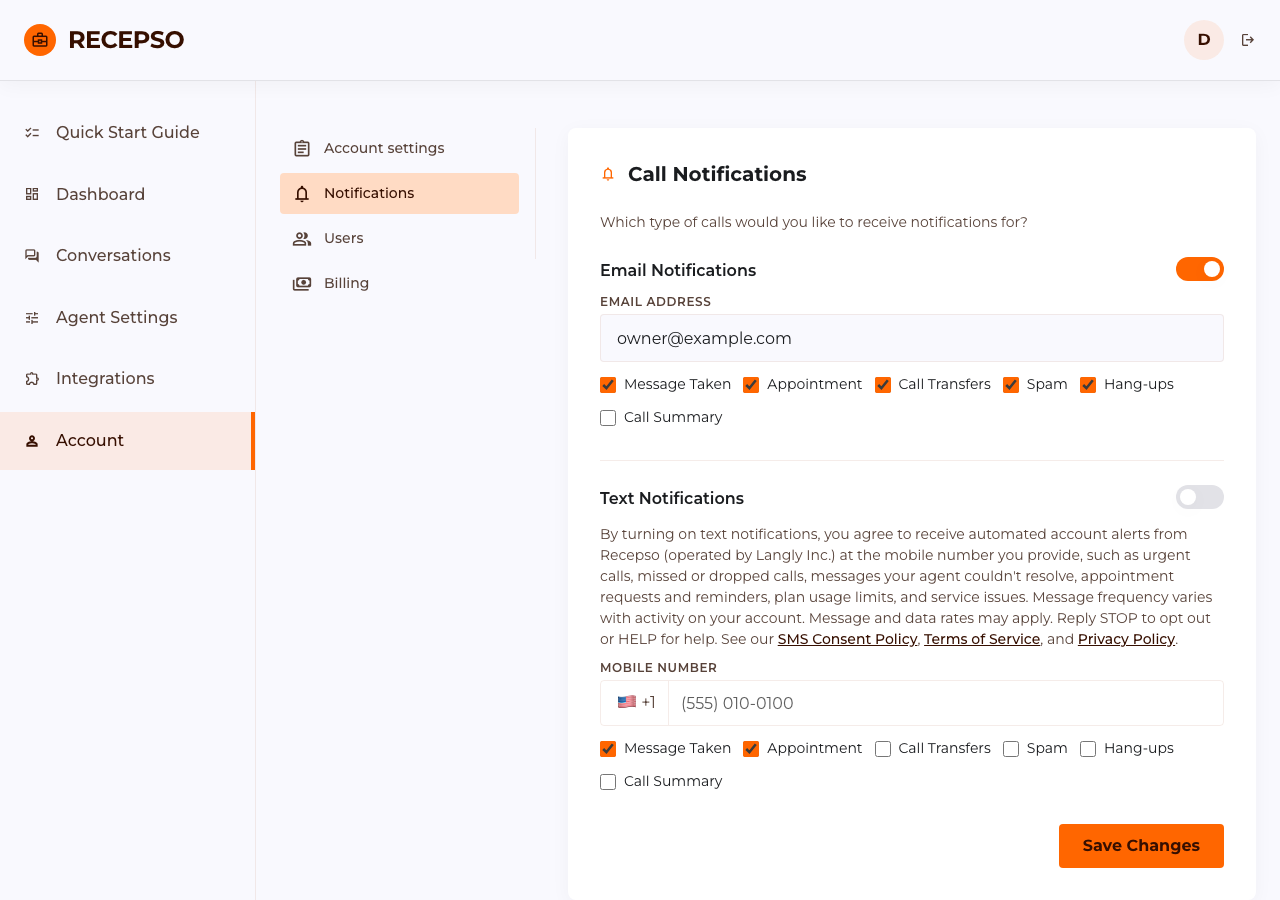
- Account > Notifications, under “Text Notifications.”
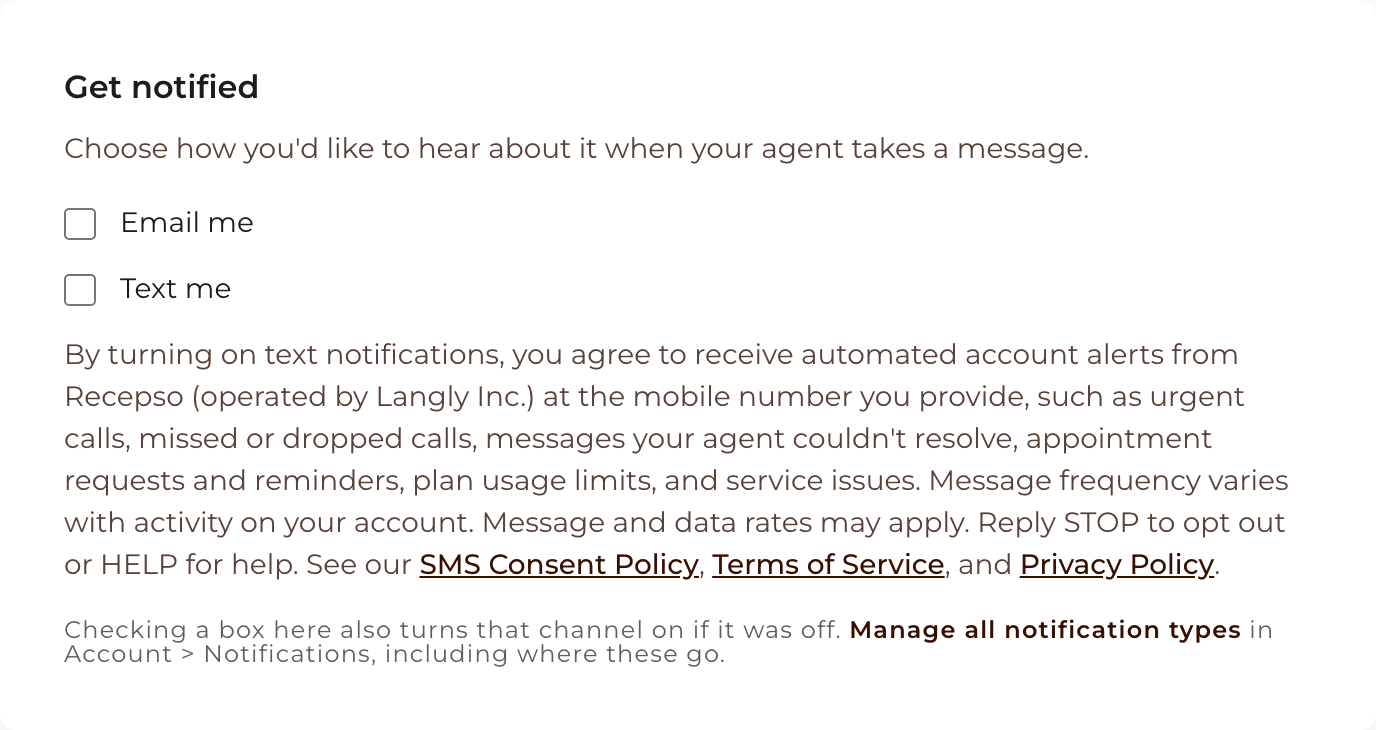
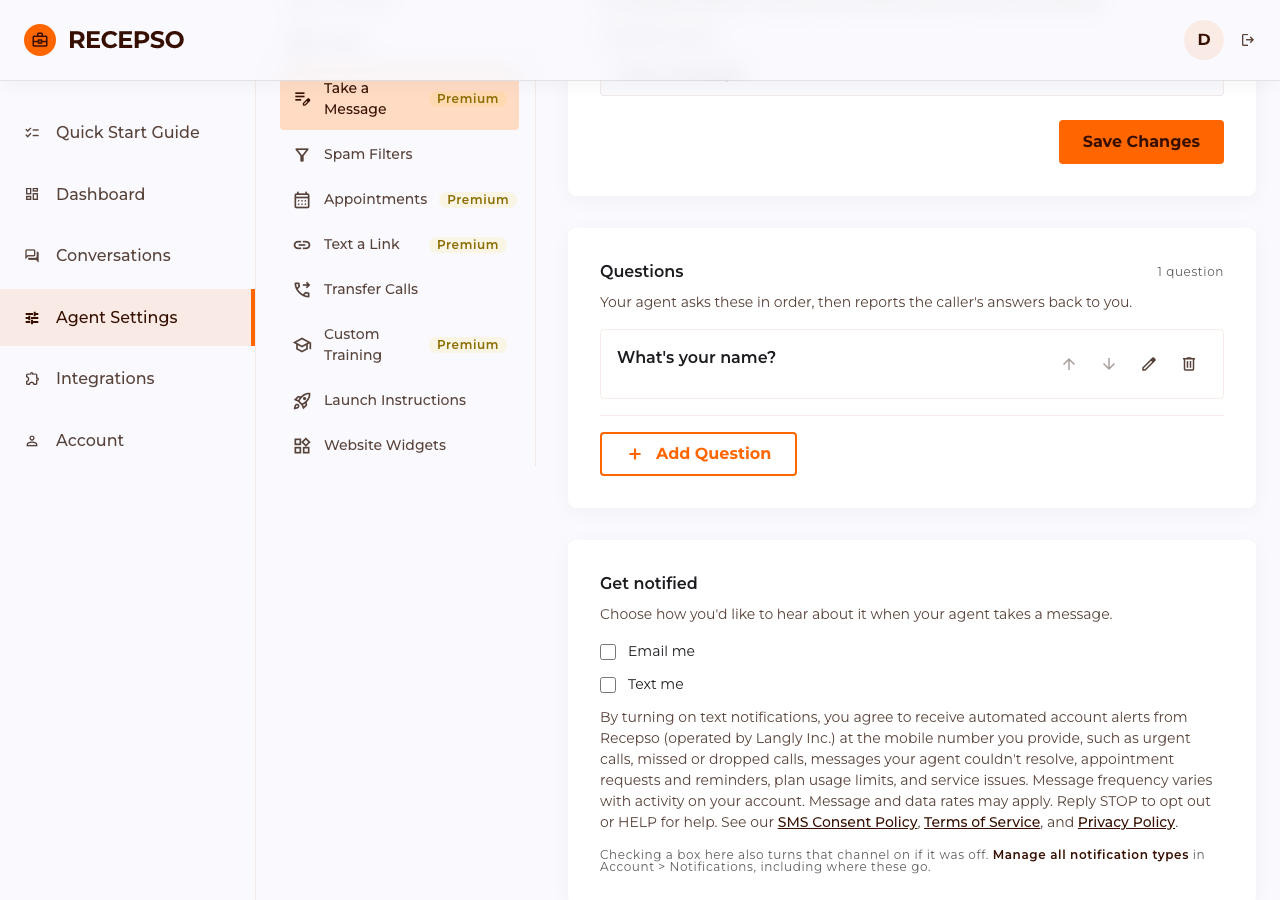
- Agent Settings > Take a Message, under “Get notified” (the “Text me” checkbox).
Text alerts are never pre-selected. During account setup the customer must answer the question “Do you want alerts by text message?” by choosing “Yes, turn on text notifications” or “No, keep text notifications off”; neither answer is selected when the step is first shown, the customer cannot continue until one is chosen (if the customer returns to the step later, it shows the answer they saved), and choosing Yes also requires a complete mobile number. In Account > Notifications the Text Notifications switch is off until the customer turns it on, and on the Take a Message screen the “Text me” checkbox is unchecked until the customer checks it. On every screen the consent disclosure quoted below is shown directly beneath the control, and entering a mobile number alone does not enroll it. Recepso sends no Program 2 text to a number unless its owner has opted in on one of these screens, and these three screens are the only way a number is added to this program.
The consent disclosure shown on all three screens reads, in full:
By turning on text notifications, you agree to receive automated account alerts from Recepso (operated by Langly Inc.) at the mobile number you provide, such as urgent calls, missed or dropped calls, messages your agent couldn't resolve, appointment requests and reminders, plan usage limits, and service issues. Message frequency varies with activity on your account. Message and data rates may apply. Reply STOP to opt out or HELP for help. See our SMS Consent Policy, Terms of Service, and Privacy Policy.
Because these screens sit behind a customer login, here is what a customer sees before opting in. These screenshots show the same screens in their default state, before the customer has done anything (no answer chosen or text alerts off, and no number entered), with placeholder sample data.
Program 2: required disclosures
The consent disclosure above is shown next to the control before a customer opts in. It identifies the sender (Recepso, operated by Langly Inc.), the kinds of alerts, that message frequency varies with account activity, and that message and data rates may apply. Every account-notification message identifies Recepso as the sender and ends with opt-out instructions (“Reply STOP to opt out.”).
Message frequency depends entirely on activity on the customer's own account (how often their AI receptionist flags an urgent call, a call is dropped or missed, an appointment needs confirming, or the customer reaches their plan limit) -- there is no fixed schedule and no promotional or marketing content is ever included. For help, replyHELP to any message, or contact us atrecepso@recepso.com.
Program 2: opting out
Reply STOP (or UNSUBSCRIBE, CANCEL,QUIT, OPTOUT, STOPALL, REVOKE, or END) to any account-notification message, or simply turn the Text toggle off on the Account > Notifications settings page, to stop receiving these texts at any time.
Related policies
This policy describes SMS/WhatsApp consent specifically. See ourPrivacy PolicyandTerms of Servicefor how we handle data more broadly.
Contact us
Questions about this policy can be sent torecepso@recepso.com.